
How Does Kestral Online Bookings Work and What Does It Mean for Practice Operations?
Target audience: Practice Owners and Practice Managers / Operations Managers
Author: [CONFIRM AUTHOR]
Internal links: See https://kestral.com.au/frequently-asked-questions-ereferrals-and-online-bookings-for-radiology-practices/ and https://kestral.com.au/frequently-asked-questions-ris-configuration-in-karisma/
Patients expect to be able to book healthcare appointments on their own terms. Outside business hours, without waiting on hold, and through a process that does not require them to navigate a complex system to secure a time. For radiology practices across Australia and New Zealand, meeting that expectation while maintaining control over scheduling accuracy, resource allocation and clinical appropriateness is the operational challenge that Kestral Online Bookings is built to solve.
For the broader case for eReferrals and online bookings as a connected workflow, see https://kestral.com.au/frequently-asked-questions-ereferrals-and-online-bookings-for-radiology-practices/.
How Does the Kestral Online Bookings Workflow Actually Operate?
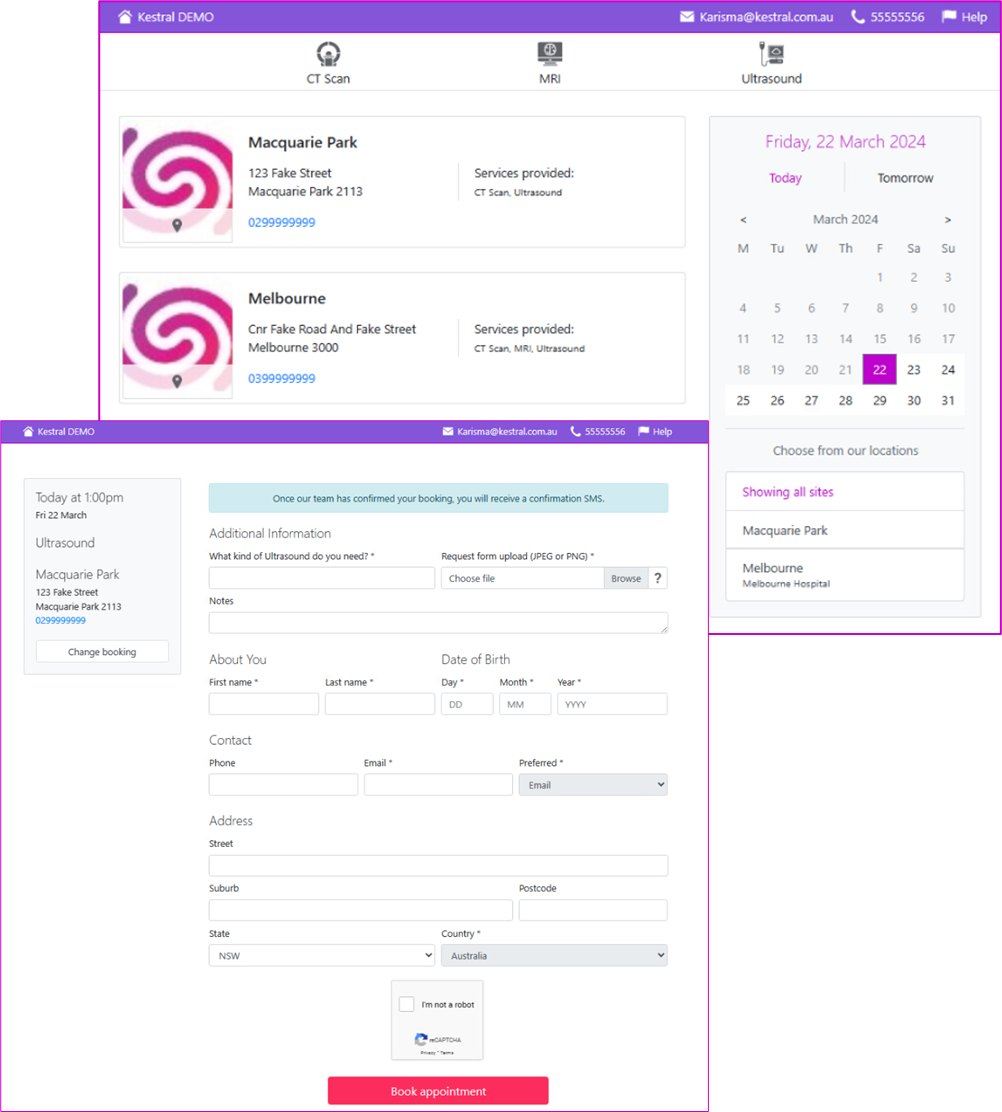
When a patient submits a booking request through the practice’s online booking page, the system immediately reserves the appropriate room and time in the Karisma diary and creates a scheduled request in Karisma for staff review. This means the appointment slot is protected from the moment the patient completes their booking, with no risk of double booking while the request sits in a queue.
Staff manage incoming requests through three structured worklists, each designed for a distinct type of booking interaction.
The Bookings worklist displays all appointments where the room, time and date have been reserved in Karisma. Depending on configuration, exam details and the patient’s request form are captured at the time of booking.
The Booking Enquiries worklist manages requests for more complex modalities where a fixed timeslot is not appropriate at the point of online submission. Rather than selecting a specific appointment time, the patient provides their contact details and request form, and indicates a preferred date and whether they would prefer a morning or afternoon appointment.
The Help Enquiries worklist captures any queries submitted through the Help function on the online booking page. Once a patient has been contacted and their query resolved, the enquiry is processed and closed.
How Does Automated Communication Reduce No-Shows and Preparation Errors?
Once a booking is confirmed, Kestral Online Bookings triggers automated patient communication via SMS or email. Patients receive an instant confirmation with their booking details and the practice’s contact information. Preparation instructions relevant to their appointment type are sent separately, ensuring patients arrive informed and ready rather than discovering preparation requirements on the day.
Booking reminders are sent closer to the appointment date, reducing the rate of cancellations and no-shows. For practices managing high examination volumes where a single unfilled slot represents a meaningful cost, automated reminders are one of the clearest return-on-investment elements of the online booking workflow.
What Scheduling Controls Does Kestral Online Bookings Give Practices?
Kestral Online Bookings is configurable at a granular level across every element of the scheduling environment. Practices define which services are available for online booking. Standard examinations can be opened for self-service scheduling. Complex procedures such as biopsies and injections can be excluded from the online channel entirely, routing patients to contact the practice directly. Modality availability, appointment durations and scheduling windows are all configurable.
For more on how booking configuration works across the broader Karisma system, see https://kestral.com.au/frequently-asked-questions-ris-configuration-in-karisma/.
What Does This Mean for Front Desk Operations?
Straightforward appointment requests that previously required a phone call are handled entirely through the online channel. Patients book at a time that suits them, the diary is updated in real time, and the confirmation and preparation instructions go out automatically. Staff are not involved until the booking is ready for clinical review, at which point the relevant information is already captured and waiting in the worklist.